Settings and access
Settings controls personal preferences and credentials. The public wiki is separate from the protected CIEL Lab application.
Search defaults
Choose a default search mode and CIEL version. Enable semantic suggestions when discovery is more important than exact matching; use textual or exact-code mode for reproducible lookups.
Release pipeline updates
Open Settings → Release pipeline updates, then select Enable notifications and approve the browser prompt. This is the account-level setup for release notifications; it is not a setting that must be repeated for every release.
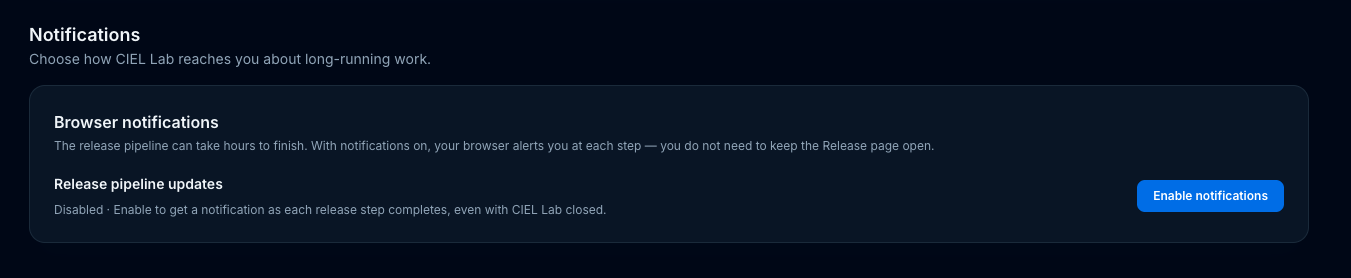
The notification setting in the protected CIEL Lab application. It is tied to this browser and this site origin.
The subscription receives a browser notification when a tracked release step completes and when one fails. It does not notify for skipped or merely in-progress steps. See which release events notify you? for the exact event list and message types.
The choice is per browser and per site, not per release. It continues to work while CIEL Lab is closed when the browser and its service worker can receive push messages.
Use Turn off to remove that browser subscription. A denied browser permission must be changed in the browser's site settings before the feature can be enabled again. The release page remains the source of truth for job status and errors.
Recover a blocked browser permission
If the page says Blocked, allow notifications for
ciellab.filipelopes.med.br in the browser's site controls, then reload
Settings and select Enable
notifications again. The exact menu varies by browser; in Chrome, open the
site controls beside the address bar and change Notifications to allow.
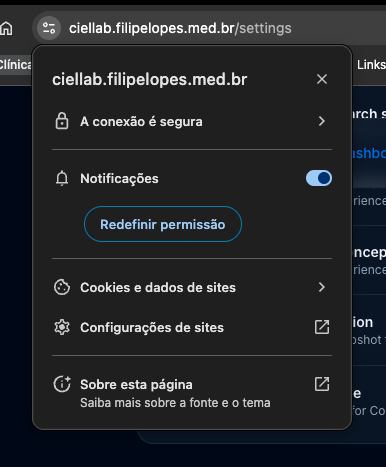
Chrome example: browser-level permission is separate from the CIEL Lab subscription.
If the card says Unavailable, use a current Chrome, Edge, Firefox, or Safari and ask an administrator to confirm that the server's Web Push (VAPID) configuration is enabled. The release itself continues even when a notification cannot be delivered.
Personal OCL token
CIEL Lab stores each user's OCL token encrypted and uses it for authorized OCL operations. This preserves the OCL audit identity and avoids a shared application-wide editor credential.
After changing the token, perform a read and a harmless authorized check before a release-critical session.
CIEL Lab personal access tokens
Personal access tokens beginning with the application's configured prefix are intended for MCP clients. They are shown once, should be stored in a secret manager or client secret field, and can be revoked independently.
Password and account administration
Users can change their password in Settings. Administrators approve accounts and manage user state in Admin → Users.
Public documentation
The GitHub Pages wiki is public and does not use Cloudflare Access. Private evidence, raw Slack exports, and unreviewed media remain excluded from Git and R2 publication.